
GIS Screening for Land & Property Decisions
See the Property More Clearly Earlier in Your Decision Process
Buying, building or conserving land? Start with a free property review to learn which screening topics deserve attention, why they matter and what a detailed GIS report would cost.
Seven Lenses. Different Questions. A Clearer View.
Selected demonstration exhibits. Select any map to open a larger view in a new tab.
Property Context Lens
How does the property look on the ground?

More About This Map
This aerial view brings the property’s shape, dimensions, nearby roads and surrounding uses into focus, helping frame questions about boundaries, access and the setting.
The yellow outlines show advertised tracts totaling 53.01 acres. The analytical maps use a separate 44.65-acre example boundary, so the acreage difference needs to be reconciled before tract-specific planning. The outlines and approximate dimensions are not a survey.
How to Read This Map
- Aerial background: Shows visible features such as vegetation, cleared areas, nearby roads and surrounding uses at the time the imagery was captured. It does not confirm current ground conditions.
- Yellow tract outlines: Show the advertised tracts totaling 53.01 acres. They are distinct from the 44.65-acre example boundary used for the analytical exhibits.
- Dimensions and acreage: Provide approximate screening references. Reconcile the advertised tracts and analytical boundary before applying findings to a specific tract.
- Roads and access: A visible road or track helps orient the property but does not establish ownership, a recorded easement or legal access.
Use the aerial to identify questions for a site visit and records review. Confirm boundary locations and dimensions through appropriate survey information.
Planning Lens
What is the future planning picture?

More About This Map
This future land-use map places the parcel within its surrounding planning context and identifies it as PD, or Planned Development. Reviewing the applicable policy alongside the map helps clarify conditions and questions for local confirmation.
Neither the mapped designation nor nearby land-use categories establish development rights on the property.
How to Read This Map
- Dark parcel outline: Identifies the subject property. Read the label inside this boundary separately from the surrounding categories.
- PD — Planned Development: The mapped future land-use designation for the subject parcel in this example. The label alone does not explain the applicable policy, conditions or permitted uses.
- RES-3 and RES-6: Residential 3 and Residential 6 categories shown in the legend. Confirm their definitions in the applicable plan before interpreting the numbers as a density allowance.
- IL, IH and ROR: Industrial-Light, Industrial-Heavy and Retail / Office / Residential categories. Their locations provide surrounding planning context; they do not assign those uses to the subject parcel.
- Policy versus zoning: Future land use expresses planning direction. Current zoning, approvals, infrastructure and site conditions must be reviewed separately.
Ask the planning authority to confirm the adopted designation, applicable policies and any amendments or project-specific conditions.
Water & Drainage Lens
Could seasonal wetness affect your intended use?
More About This Map
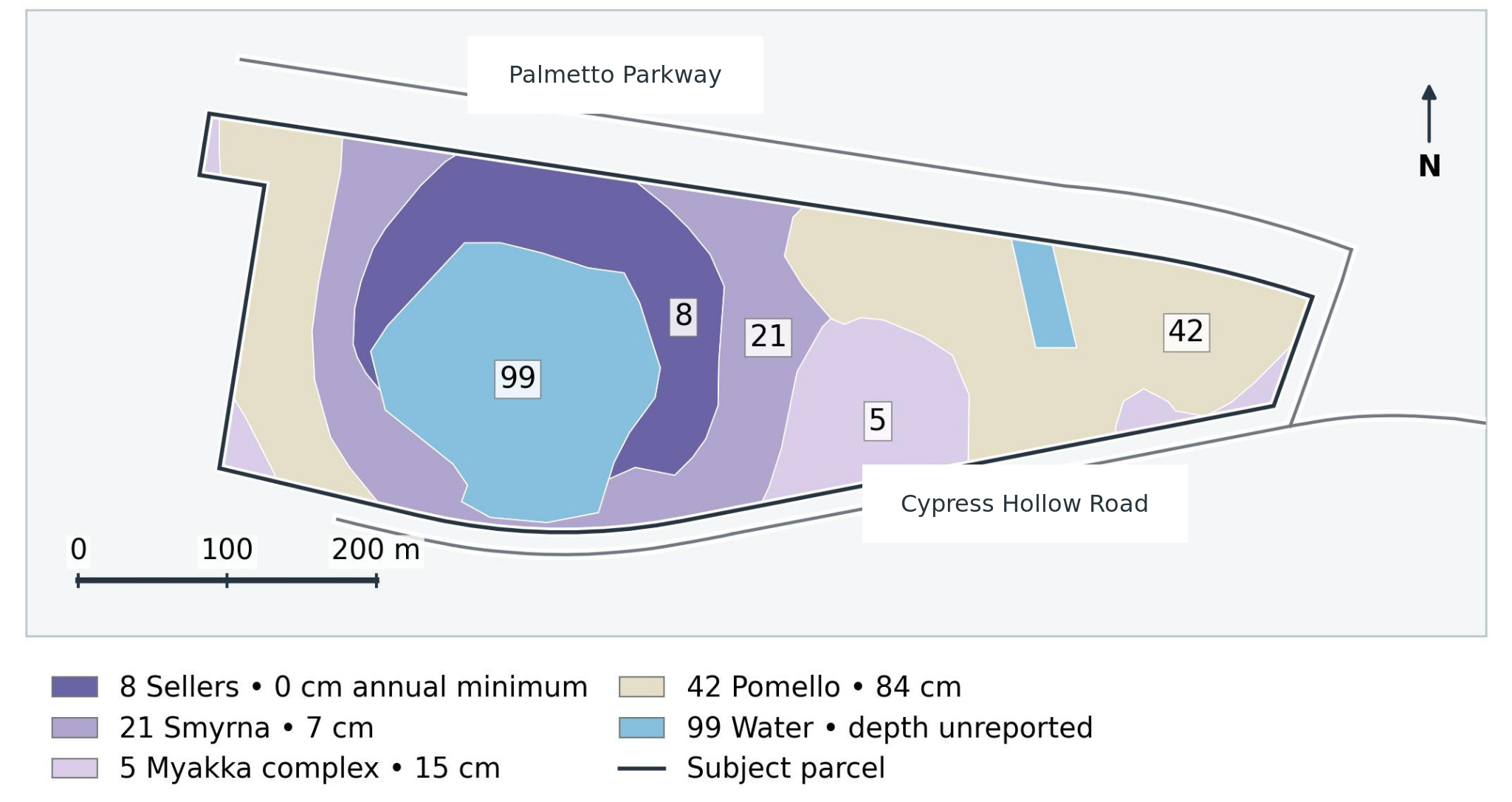
Published seasonal water-table depths and drainage classes highlight where shallow groundwater and poorly drained soils could affect the property’s intended use. Poorly or very poorly drained soil map units cover 15.65 acres in this demonstration, helping identify where site-specific soil and groundwater investigations may be needed.
How to Read This Map
The legend shows published annual minimum depths to the seasonal water table, measured downward from the ground surface. Smaller numbers indicate shallower seasonal saturation.
| Map label | How to interpret it |
|---|---|
| 8 Sellers · 0 cm | Published seasonal saturation reaches the ground surface. |
| 21 Smyrna · 7 cm | Approximately 3 inches below the surface. |
| 5 Myakka complex · 15 cm | Approximately 6 inches below the surface. |
| 42 Pomello · 84 cm | Approximately 33 inches below the surface. |
| 99 Water · Unreported | Mapped open water; no soil water-table depth is reported. |
| Dark parcel outline | Identifies the property boundary, not a wetness class. |
The numbers before the soil names identify map units; they are not severity scores. These published estimates are not current groundwater measurements and do not mean those depths occur everywhere or throughout the year. Site testing is needed to assess actual conditions.
Septic Screening Lens
What soil limitations could affect septic suitability?

More About This Map
This soil interpretation highlights potential limitations for septic tank absorption fields. The fictional example assigns 86.9% of the analysis area to Somewhat limited and 13.1% to Very limited. The ratings help focus qualified site evaluation; the full report explains the contributing soil factors.
How to Read This Map
- Yellow — Somewhat limited: Soil features may require special planning, design or installation.
- Pink — Very limited: Soil features present stronger limitations and may require substantial modifications or special design.
- Labels such as CeB and GwE2: Identify soil map units, not suitability scores. The full report explains each unit and its limiting factors.
- Solid magenta outline: The fictional analysis boundary. The dashed line is an illustrative tract divider, not a surveyed boundary.
These example ratings do not determine septic approval. A qualified soil and site evaluation is needed to assess an actual installation.
Habitat Lens
What habitat questions deserve attention?

More About This Map
Land-cover mapping shows the arrangement of water, vegetation and other cover types. This example identifies cypress, aquatic vegetation and open water as habitat context.
Additional wildlife studies can help determine whether protected species use these habitats and identify any related restrictions or requirements that could affect the property’s intended use. Mapped land cover alone does not establish species presence or absence or replace field surveys.
How to Read This Map
- Dark green — Cypress: Mapped cypress cover provides habitat context. It does not establish a jurisdictional wetland boundary or confirm which species are present.
- Light green — Floating/emergent vegetation: Vegetation associated with aquatic settings. Read it alongside open water and surrounding cover to identify areas for closer biological review.
- Blue — Natural Lakes and Ponds: Mapped open-water cover. The category does not establish water depth, seasonal conditions or regulatory status.
- Other land-cover classes: Mowed Grass, Residential, low density, and Transportation describe mapped cover or use patterns. They are not zoning designations or development approvals.
- Species and habitat review: Land cover helps identify where to investigate. Species records and qualified field studies are needed to evaluate whether protected species use these habitats.
The map is a screening overview. A qualified biologist can advise on records review, survey timing and any species-specific studies that may be needed.
Terrain Lens
Where could steeper ground affect planning?

More About This Map
Slope mapping highlights potential terrain constraints that may affect access, grading and site layout. In this Williamson example, 4.69 acres (19.7%) exceed 15% slope, including 1.08 acres above 25%, helping focus further evaluation on steeper parts of the property.
The 15% threshold is a screening choice, not a legal no-build limit. Current topographic information is needed before making grading, drainage or site-design decisions.
How to Read This Map
- Green shades — 0–10% slope: The two green classes show the gentler mapped terrain. Gentle slope does not establish that an area is suitable for construction or free of other constraints.
- Yellow, orange and red: Yellow represents slopes above 10% through 15%; orange represents above 15% through 25%; red represents above 25%.
- What percent slope means: A 15% slope rises or falls 15 feet over 100 feet of horizontal distance. Percent slope is different from an angle measured in degrees.
- Reading the acreage: The 4.69 acres above 15% slope already include the 1.08 acres above 25%. Do not add the two figures together.
- Boundary and road: The dark outline identifies the fictional property boundary. The gray line shows the mapped road centerline, not the road’s legal width.
This screening uses 2024 elevation data. Current topographic survey and site evaluation are needed to confirm terrain for grading, drainage and design.
Combined Constraints Lens
How do the selected constraints overlap?

More About This Map
Combining mapped wetlands, a 50-foot analytical stream buffer and slopes above 15% shows where selected constraints overlap. Together, these features cover 7.60 acres (31.8%) of the Williamson example, counting overlapping areas once.
The remaining 16.26 acres (68.2%) lie outside this selected footprint. Soil limitations, access, utilities, planning requirements and other constraints still need separate review. The stream buffer is a screening scenario, not a verified regulatory setback.
How to Read This Map
- Terracotta — Selected constraint footprint: Land within one or more of the three selected layers. Overlapping features are counted once.
- Green — Outside selected footprint: Land outside those selected features. Green does not mean confirmed buildable land.
- Dark outline: The fictional property boundary. The gray line identifies the road centerline.
Use this combined view to focus further investigation and early layout questions. It does not identify an approved development area.
Know Which Questions Deserve a Closer Look
Your free preliminary report considers a broad range of topics using available federal, state and local maps and records. It explains what we recommend, what is optional, what is not required for your plans and what needs more information—with reasons for each decision.
If you choose a detailed report, each selected topic becomes a complete exhibit combining relevant maps, evidence and clear findings. The report also identifies appropriate fieldwork, specialist or agency follow-up.
The seven examples above illustrate possible exhibits. Your recommendations depend on your property and plans; the master list includes 36 topics, including two supporting exhibits, and can expand when local conditions warrant.
See What the Reports Look Like
See how the preliminary report introduces the property and recommends a scope, then how the full report presents maps and findings. Explore the two stages or choose a demonstration project.
Each Demo / Exhibits page brings together its maps and links to the preliminary and full PDFs. Demonstrations may show earlier report formats; current scope and pricing are confirmed in your proposal.
Explore the Complete Demo Projects
Start with Your Property and Your Plans
The free review helps you decide what to investigate before commissioning detailed analysis. There is no obligation to purchase a detailed report. Have a question first? Ask me about your property or the screening process.
01 · Start free
Introduce Your Property
Share the location, intended use and any known concerns—whether you are buying, building, conserving land or reviewing a proposal.
02 · Review your proposal
Understand the Recommendations
Receive a property overview, topic recommendations with reasons, optional additions and a proposed detailed-report price. You approve the scope and price before paid work begins.
03 · Go deeper
Receive Maps and Findings
If you approve the proposed work, your detailed report presents one complete exhibit per selected topic, explains the evidence and identifies appropriate follow-up. Other topics can be added by request.